Caribooks is billed by the number of companies, monthly or yearly, on Settings → Billing. Only the account owner can change the plan; a team member sees where the account stands and who manages its billing.
The free trial
Your trial lasts 14 days and starts when you connect your first QuickBooks company, not when you sign up. Someone who signed up through a referral link gets 30 days.
The trial includes everything: the connector and Autopilot on every company you connect. No card is asked for and nothing is charged. When it ends, QuickBooks access stops until you choose a plan: your assistant is turned away, and loops stop running. Your connections, documents, rules and loops are kept.
Prices
Prices are shown before tax.
Connector: your QuickBooks books inside Claude, ChatGPT or Microsoft Copilot.
| Companies | Per month |
|---|---|
| 1 | $39 |
| Up to 5 | $99 |
| Up to 10 | $199 |
| Up to 25 | $399 |
Autopilot: the connector plus loops, rules and a document box that gets filed. Each bundle includes the connector for the companies on Autopilot.
| Companies | Per month |
|---|---|
| 1 | $149 |
| Up to 5 | $299 |
| Up to 10 | $499 |
| Up to 25 | $999 |
Prices are in CAD in Canada and in USD elsewhere, with the same numbers. Checkout sets the currency, and a subscription keeps it for life. Sales tax (GST, HST, QST and the like) is added at checkout from your billing address, and checkout also asks for your tax number if you have one.
Connector and Autopilot companies on one plan
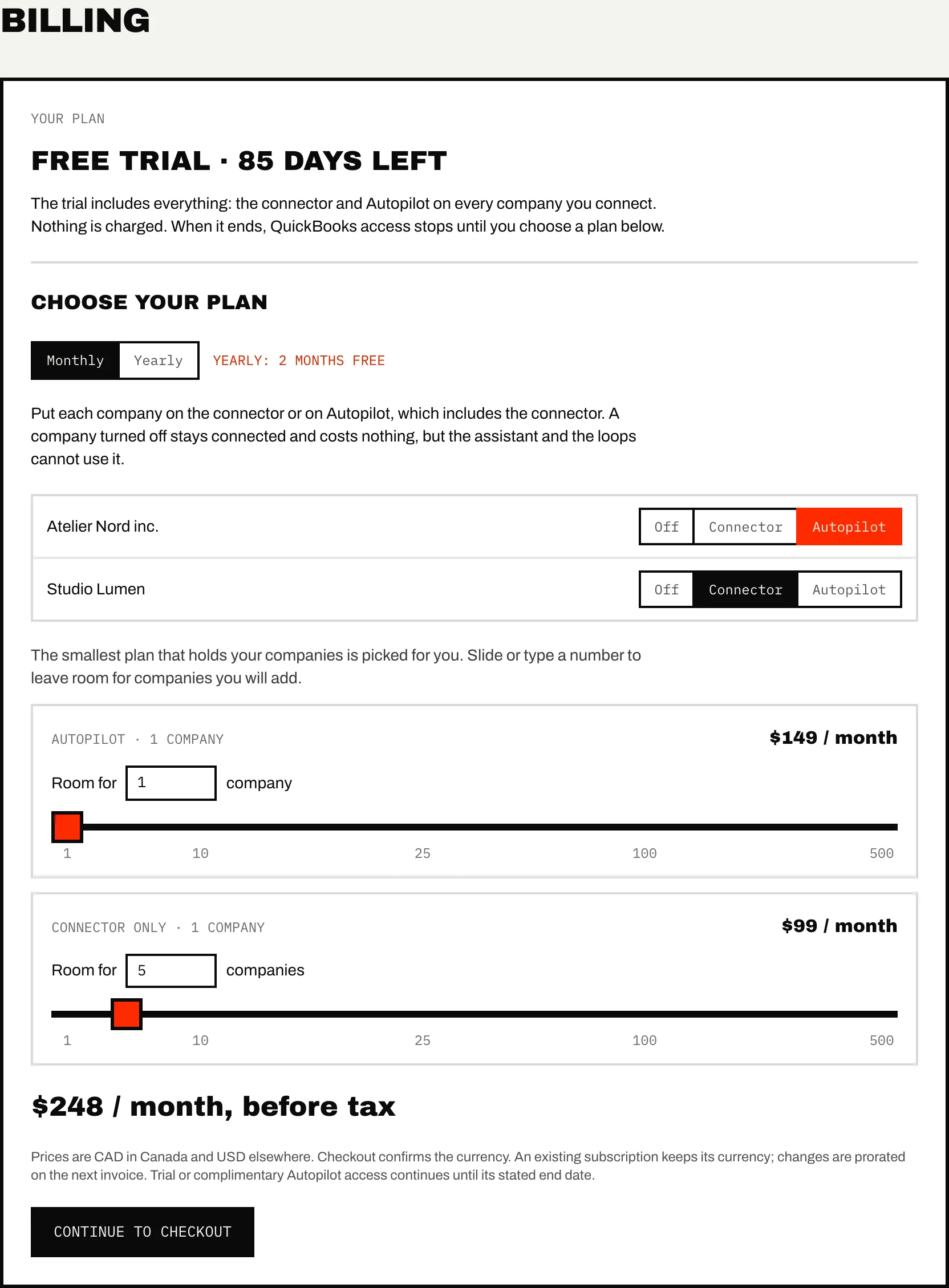
With several companies connected, the form lists each one with three choices:
- Off: the company stays connected and costs nothing, but the assistant and the loops cannot use it. Its documents still arrive in the document box and wait.
- Connector: billed on the connector bundle.
- Autopilot: billed on the Autopilot bundle, connector included.
Once you have more than three companies, an Every company: row sets all of them at once. The form picks the smallest bundle that holds the companies of each kind. To leave room for companies you will add later, slide or type a number next to Room for. A count that falls inside a bundle is billed as that bundle, and the form says so ("billed as the 10-company plan").
Both bundles sit on one subscription, with one billing period. With a single company, the form shows two cards instead, Connector and Autopilot.
More than 25 companies
Past 25, each additional company is billed on top of the 25-company bundle, at a rate that drops as the count grows:
| Company number | Connector, each | Autopilot, each |
|---|---|---|
| 26 to 50 | $11 | $28 |
| 51 to 100 | $9 | $23 |
| 101 to 150 | $8 | $21 |
| 151 to 200 | $8 | $19 |
| 201 to 300 | $7 | $18 |
| 301 to 500 | $6 | $16 |
| Over 500 | $5 | $14 |
Yearly billing
Switch Monthly to Yearly at the top of the form. A year costs ten months, so two months are free; the form shows both the yearly price and what twelve months would have cost.
Subscribing
- Open Settings → Billing.
- Choose monthly or yearly, then place your companies.
- Check the total under the form, for example "$248 / month, before tax".
- Press Continue to checkout and pay on Stripe's page.
Your choices apply once Stripe confirms the payment; closing the checkout page changes nothing.
If you subscribe before your trial ends, billing starts at checkout and you keep the rest of the trial. Until its last day, Autopilot runs on every company that is not turned off, whatever your plan, and your assistant reaches every one of them. When your plan leaves a company on the connector, the sidebar counts the days down: "Trial Autopilot: 9 days left". Once the trial is over, only the companies your plan puts on Autopilot run on it. A company you turn off is off from checkout, and connecting a new company needs a free place in your plan.
Changing your plan
Once you subscribe, the page shows your bundles, how many companies each holds, your price and your renewal date. Discounts and referral credit appear on the Next invoice line, tax included.
- Press Change plan.
- Move companies between Off, Connector and Autopilot, resize a bundle, or switch between monthly and yearly.
- The form shows the new total and the difference, such as "New total: $248 / month (+$99)".
- Press Update plan.
The difference is prorated on your next invoice. The form refuses a plan too small for the companies placed on it.
When every place in your plan is taken and you connect another company, Caribooks first asks where it goes (Add on the connector or Add on Autopilot), shows the new total, grows the plan by one, then opens QuickBooks.
Card and invoices opens Stripe, where you update your card and see your invoices.
When a payment fails
When Stripe cannot collect a payment, the plan reads Payment failed, every portal page shows a warning, and you get an email. QuickBooks access is paused until the card is updated: your assistant is refused and loops stop. Press Update card to fix it; access comes back as soon as Stripe takes the payment.
Cancelling
- Press Cancel subscription.
- Press Confirm cancellation.
Your access continues until the end of the paid period, and the plan reads "Active, cancellation scheduled". Until that date, Keep my subscription undoes it in one click. Changing your plan also lifts a scheduled cancellation.
A second trial
If your trial ended without a subscription, the owner can restart it once, for 7 days, from a Try it again for 7 days box on the billing page. Everything is included again, Autopilot too, and nothing is charged; when the 7 days end, access pauses again. The 7 days count from the moment you press Start my 7 days. An account that subscribed and later cancelled does not get this offer.
Questions about a charge go to support@caribooks.com.